
ตามประกาศกรมสรรพากร เรื่องการจัดทำ ส่ง หรือเก็บรักษาใบกำกับภาษี โดยใช้ใบรับรองอิเล็กทรอนิกส์ในการลงลายมือชื่อ ข้อ 6 “การเปลี่ยนแปลงใบกำกับภาษีอย่างย่อ (ABB) เป็นใบกำกับภาษีฉบับเต็ม จะต้องระบุวันเดือนปีของวันที่จัดทำใบกำกับภาษีเต็มรูป และใช้เลขที่ใหม่”
เราปรับปรุง getinvoice version ใหม่ ให้สอดคล้องกับกฎระเบียบดังกล่าว และมาพร้อมกับ Feature อื่นๆ ที่ช่วยให้คุณทำงานได้สะดวกยิ่งขึ้น
Highlight
(1.) วันที่ออกเอกสาร Full-Tax จะเป็นวันที่สร้างเอกสารเสมอ
อ้างอิงประกาศกรมสรรพากร (ประกาศวันที่ 7 มิถุนายน 2566) เรื่อง การจัดทำ ส่ง หรือเก็บรักษา ใบกำกับภาษี โดยใช้ใบรับรองอิเล็กทรอนิกส์ในการลงลายมือชื่อ ข้อ 6 ระบบ getinvoice จะเปลี่ยนแปลงการออกใบกำกับภาษี ดังนี้
- เลขที่ใบกำกับภาษีเต็มรูป (จากการแปลงมาจากใบกำกับภาษีอย่างย่อ ABB) จะเป็นเลขที่ใหม่ และระบุวันเดือนปีให้ตรงกับวันเดือนปีที่จัดทำใบกำกับภาษีเต็มรูป (กรณีวันที่ออกใบกำกับภาษีอย่างย่อ ABB ก่อนหน้าการแปลง จะถูกเปลี่ยนแปลงวันที่ให้เป็นวันที่ใหม่)
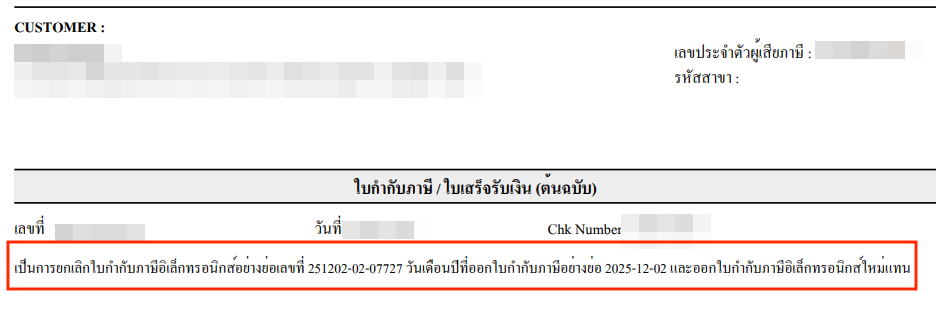
- แสดงข้อความประกอบใบกำกับภาษีเต็มรูปที่สร้างขึ้นใหม่ ดังนี้
“เป็นการยกเลิกใบกำกับภาษีอิเล็กทรอนิกส์อย่างย่อเลขที่ …(ของABB)… วันเดือนปีที่ออกใบกำกับภาษีอย่างย่อ …(วันที่ของ ABB)… และออกใบกำกับภาษีอิเล็กทรอนิกส์ใหม่แทน”
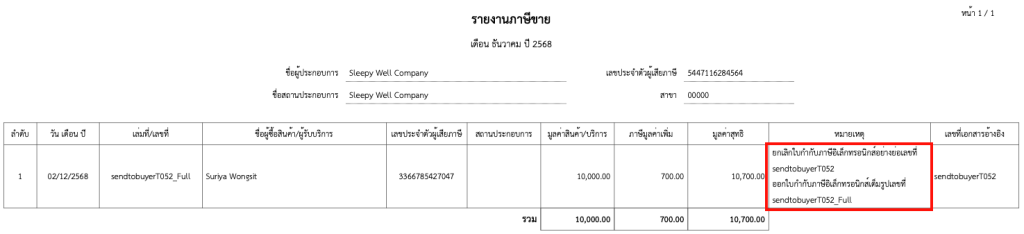
- แก้ไขข้อความในช่องหมายเหตุ ของรายงานภาษีขาย โดยแสดงข้อความต่อไปนี้
“เป็นการยกเลิกใบกำกับภาษีอิเล็กทรอนิกส์อย่างย่อเลขที่ …(ของABB)… ออกใบกำกับภาษีอิเล็กทรอนิกส์เต็มรูปใหม่แทนเลขที่ (ของFull Tax)”
What’s New
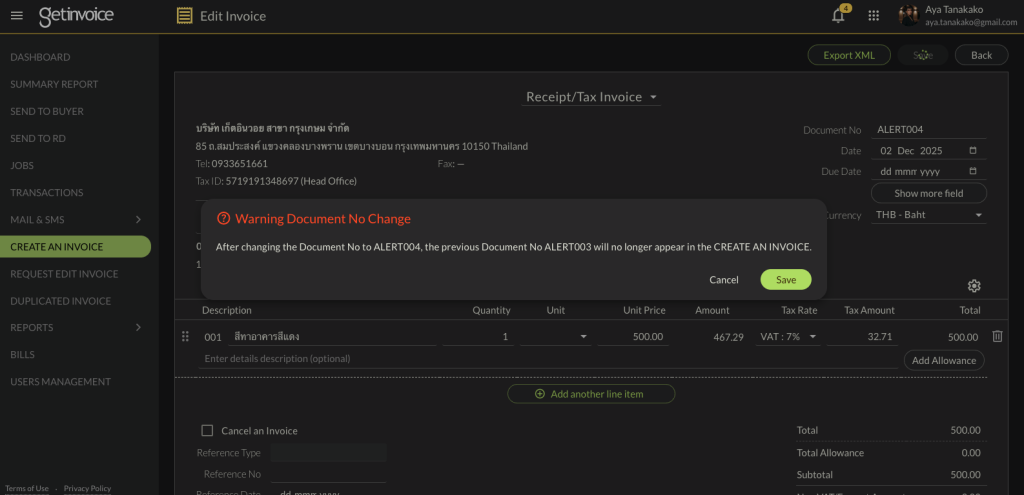
(1.) ในหน้าจอ CREATE AN INVOICE มีข้อความเตือน กรณี User แก้ไข Invoice No. (มีข้อความเตือนภาษาไทย สำหรับผู้ใช้งานภาษาไทย)
เมื่อผู้ใช้งาน เปลี่ยนแปลงหมายเลขใบกำกับภาษีที่หน้าจอ CREATE AN INVOICE จะไปปรากฎเอกสารใบเก่า (และเลขที่เก่า) ในหน้า KEYIN อีกต่อไป
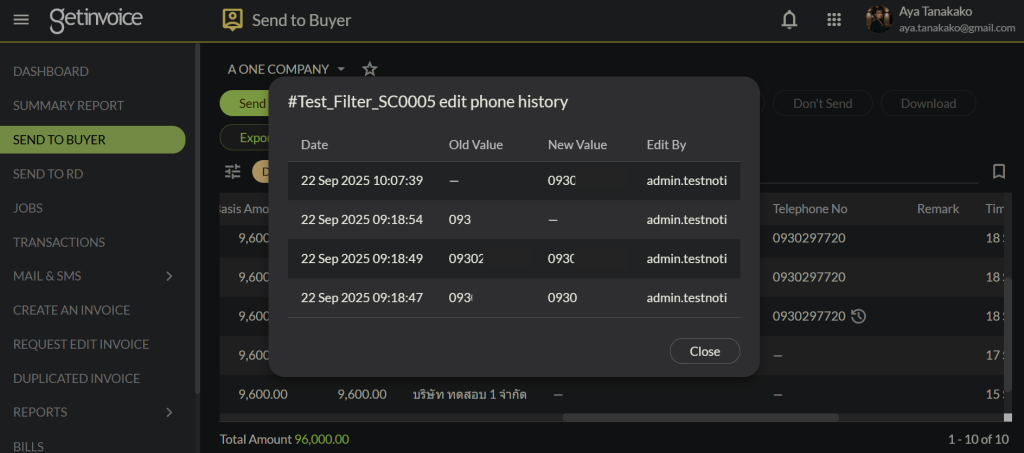
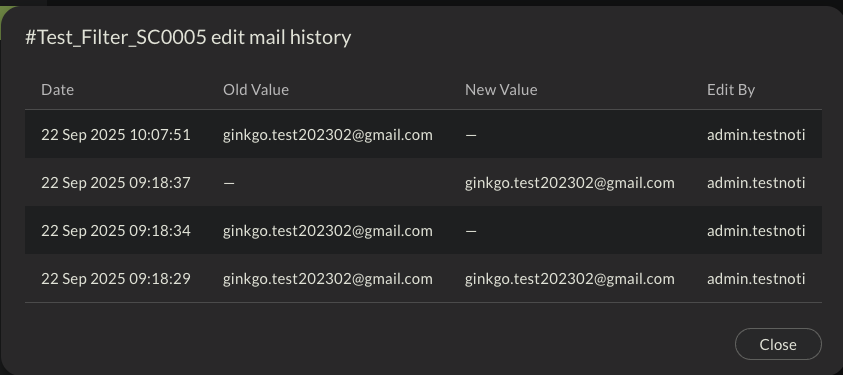
(2.) เปลี่ยนแปลงการเรียงลำดับวันที่ในหน้าจอโดยแสดงรายการที่แก้ไขล่าสุดไว้ด้านบนของหน้าจอต่อไปนี้
- Send SMS
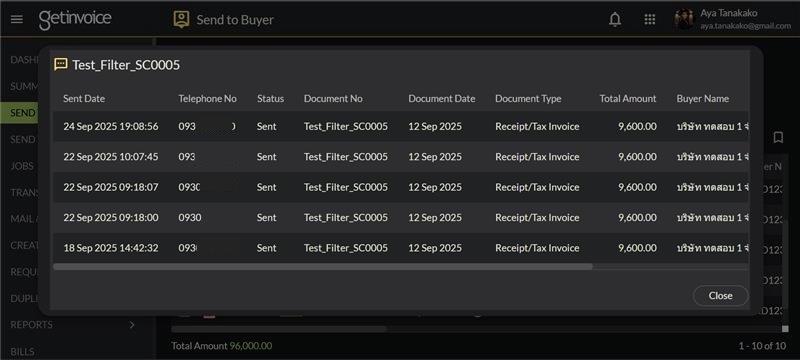
- Edit Phone History
- Email History
According to the Revenue Department’s announcement Regarding the preparation, submission, or retention of tax invoices using an electronic certificate for signature (Clause 6) : The conversion of an abbreviated tax invoice (ABB) into a full tax invoice must specify the date (day, month, year) of the preparation of the full tax invoice and use a new invoice number.
We have updated the new version of getinvoice to comply with this announcement, and it also comes with other features to help make your work more convenient.
Highlight
(1.) The issue date of the full-tax document will always be the date the document is created
Referring to the Revenue Department’s Announcement (Issued on June 7, 2023) Regarding the preparation, submission, or retention of tax invoices using an electronic certificate for signature, Clause 6, the getinvoice system will implement the following changes for issuing tax invoices:
- Full Tax Invoice Number (Converted from an Abbreviated Tax Invoice – ABB) will be a new number and the date (day, month, year) will be specified to match the date of preparation of the full tax invoice. (In cases where the issue date of the abbreviated tax invoice (ABB) is prior to the conversion, the date will be changed to the new date.)
The following text will be displayed on the newly created full tax invoice:
“This is a cancellation of the electronic abbreviated tax invoice number (ABB number) with an issue date of (ABB date), and a new electronic tax invoice is issued in its place.”
The text in the Remarks column of the Sales Tax Report will be modified to display the following message:
“Cancelled electronic abbreviated tax invoice number (ABB number). Issued new electronic full tax invoice number (Full Tax number).”
What’s New
(1.) On the CREATE AN INVOICE screen, there is a warning message when a user edits the invoice number. (A Thai warning message is available for Thai users.)
When the user changes the invoice number on the Create an Invoice screen, the old document (and the old number) will no longer appear on the Keyin screen.
(2.) Change the date sorting order on the screen to display the most recently modified item at the top of the following screens:
- Send SMS
- Edit Phone History
- Email History